
Ternoshare iCareFone
Developer: Ternoshare
5 (1)-
 Windows
-
 Mac OS
-
 Android
-
 iOS

Choose a platform
-
Windows Version 6.0.1.24
2 MB
DownloadRecommended for your device
-
Mac OS Version 5.0.1
50 MB
Download45 security vendors checked this file
Recommended for your device
-
Get it on Google Play
Android
Recommended for your device
-
Download on the App Store
iOS
Recommended for your device
Overview
Ternoshare iCareFone is a popular tool for cleaning and transferring system data. The application allows you to easily adjust the problems of the hardware device without losing system data. You can install the software for Windows, Mac OS, Android for free. To download Ternoshare iCareFone for free for the official version, you can follow the link that is on our page.
Main features of Ternoshare iCareFone
Most often, the built-in features of the program for convenient use are of great interest to users. Ternoshare iCareFone offers the following features:
- an external drive will allow you to manage data;
- it is possible to synchronize files with iPhone devices;
- creating a backup;
- two stages of cleaning;
- free system analysis;
- if the user wants to restrict access to the application, it is enough just to enable the "password protection" function.
Quick installation of the program
To successfully install the program on a computer, laptop, phone or tablet, follow a simple instruction:
- follow the link to install;
- familiarize yourself with the contents;
- read about the functions and features;
- find out about supported devices;
- find the built-in panel "Download", "Install" or "Download";
- click on the button to install.
The process of work
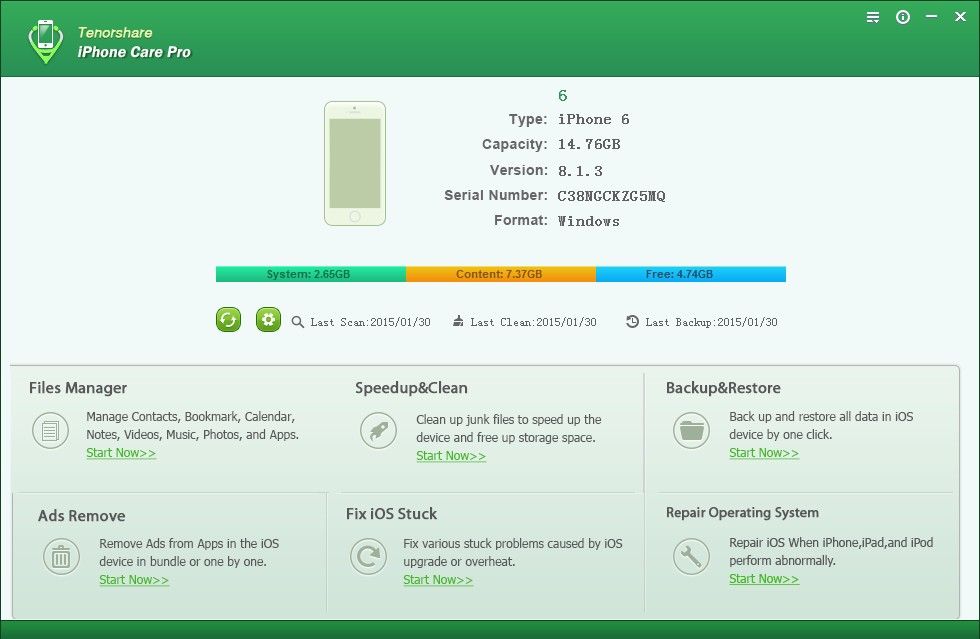
So, the program interface is divided into tabs, which are divided into rows of functions. One of the useful features is "Management", through which you can view data. Transfer media files easily using your phone to your computer or do the reverse operation. The user has the opportunity to create backups. The program also creates a backup of the device. Ternoshare iCareFone offers to clear the cache and delete unnecessary files in order to avoid memory clogging. Purification takes place in two stages: "Quick clean" and "Deep clean". To correct programming errors, the user only needs to activate the "Fix Stuck" function. The program has built-in analysis, with the help of which the status of the device changes in accordance with the criteria. After that, the app will show statistics.
Result
So, after a full familiarization with the application, we can conclude that the installation, as well as the use of the program, is easy and comfortable for all users of optimizer applications.
Features
Pros
- Confidential connection and file storage
- Convenient device management
Cons
- Slow response when backing up
Screenshots
Ask a Question
Similar programs
-
 AirDroid AirDroid
3.6 (9) Free 38 049
Windows, Mac OS, Android, iOS
View AirDroid -
 Any video converter Anvsoft Inc. (AVCLabs)
4 (6) Free 27 520
Windows, Mac OS
View Any video converter -
 Bitdefender Antivirus Bitdefender
4.7 (10) Free 348 855
Windows, Mac OS, Android, iOS
View Bitdefender Antivirus


